Help
Troubleshooting and FAQ
Keep big models quick
Ciwb copes with models of a few million voxels, but a few habits keep it smooth.
- Split big scenes into objects. A landscape, a house and a tree as three layers are easier to hide, lock and work on than one huge layer.
- Hide what you're not working on. Shift+H hides everything but the active object, Alt+H shows it all again. Or turn off Show other objects while editing in Settings.
- Turn off Voxel edges and Wireframe on very large models. They add a lot of lines.
- Work on a selection. Operations and shaders run faster on a selected area, and the live preview of an operation stops at 400,000 voxels anyway.
- Use Fast while you set up a render. Switch to Path traced only for the final image.
- Turn on Save power when Ciwb is in the background (Settings > Interface) on a laptop. Ciwb then stops redrawing while you're in another app.
- Save versions instead of piling up undo. Undo keeps the last 500 steps; a named version is a cheaper way back to a known point.
Size limits
Some actions refuse to go past a safe size so a slip of the mouse can't freeze your computer. When you hit one, Ciwb tells you in a message at the bottom of the window.
| Action | Limit | What happens |
|---|---|---|
| Double Resolution (Double in the Transform panel) | The result can't be more than 1,000,000 voxels in one object | The button greys out, and the message says how many voxels it would have made. |
| Repeat Selection… | The copies can't add up to more than 3,000,000 voxels | "That would create too many voxels". Use fewer copies or a smaller selection. |
| Scale operation | 2,000,000 voxels | The scale is reduced to fit. |
| Repeat operation | 2,000,000 voxels | The number of copies is reduced to fit. |
| Operation live preview | 400,000 voxels | "Preview is limited to 400,000 voxels; select a smaller area." You can still apply it. |
| Fill brush | 500,000 connected voxels per click | |
| Face brush | 200,000 voxels per face | |
| Box brush | 2,000,000 voxels per box | |
| Import Image… | Warns above about 3,000,000 voxels | "That is a lot; try a smaller size." |
| Water fill | 2,000,000 voxels | Stops; Check Scene can find leaks. |
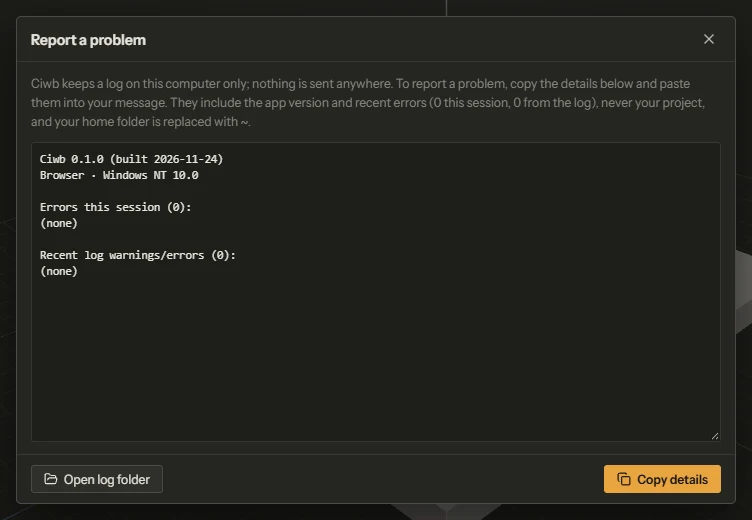
Something went wrong: report a problem
- Open Help > Report a Problem….
- Click Copy details.
- Paste them into your email or message, with a line about what you were doing.
The details hold the app version and recent errors: the ones from this session and the latest from the log. They never include your project. Your home folder is replaced with ~, so your Windows user name isn't in there.
Open log folder shows the log file, ciwb.log, in Explorer. It lives in:
%LOCALAPPDATA%\com.ciwb.app\logs
(The folder name is an old internal name, kept so your settings and autosaves carry over between versions.)
Privacy
- Ciwb works offline. Modelling, rendering, importing and exporting all happen on your computer.
- No telemetry. Ciwb doesn't collect usage data, and nothing is uploaded, not even error reports. You decide whether to copy and send them.
- The only time it goes online is to check for updates, at most once a day, and when you choose Help > Check for Updates….
- Autosaves, versions, recent projects and settings are stored on this computer only.
FAQ
I closed Ciwb without saving. Is my work gone?
Probably not. Open Ciwb and click Continue on the start screen. Autosave keeps a copy of what you were working on. It only keeps the current project, though: if you started a new one since, the old autosave was replaced.
The footer says "Not backed up"
The safety copy couldn't be written, usually because the disk is full. Save to a file with Ctrl+S straight away.
My brush is editing the wrong object
Turn on Brushes Edit Only the Selected Layer (Settings > Display, or search for it with Ctrl+K). Brushes then only touch the active layer. You can also lock other layers with L.
Nothing happens when I draw
- The object may be locked. Press L to unlock it.
- You may be in World view. Press Tab for Model view.
- You may be outside the object's space box. Make it bigger with the size chip on the toolbar.
- With a selection, Paint only changes selected voxels. Press Ctrl+D to deselect.
Some voxels have vanished
You may have hidden them: H with a selection hides voxels rather than the whole object. Press Alt+H to show hidden voxels and objects again. Also check Section Cut (Alt+B) isn't on.
Space doesn't open Find an action
In the Animate tab, Space plays and pauses the clip. Use Ctrl+K or F3 there instead.
The update check says updates aren't set up
The build you have doesn't have updates switched on. Download the latest installer instead.
Windows says "Windows protected your PC"
That build isn't code-signed. Click More info, then Run anyway.
Where are my Library models and shaders?
By default in Documents\Ciwb\Library and Documents\Ciwb\Shaders. Change either folder in Settings.
Can I open my project on another computer?
Yes. Copy the .ciwb file across. Versions stay behind on the first computer, because they're stored there, not in the file. Background pictures in the Render tab aren't saved in the project either.